Google Ads call tracking: how converted calls get back to Google Ads
Google Ads call tracking ties each phone call to the ad click that started it. It then tells Google Ads which of those calls converted, and what each was worth.
TrackDrive's Google Ads integration does the second half. When a call on a mapped offer carries the Google click id, it reports the call to Google Ads once the call's buyer converts, along with the call's revenue.
Why send calls back to Google Ads
The integration lets Google Ads receive what happened after the lead entered TrackDrive, not only the click or the form fill.
The best ad click isn't always the one that brings the most leads. A better signal is the click whose lead later converts with a buyer.
Reporting those calls back lets your campaigns bid on the clicks that turn into revenue.
What the gclid is
A gclid, short for Google Click Identifier, is a value Google Ads adds to the page address when someone clicks your ad. Google adds it when auto-tagging, a Google Ads setting, is on (Google's auto-tagging page).
Google Ads uses the gclid to tie a reported conversion back to the click behind it. Without one, TrackDrive doesn't report the call.
The click id has to be captured first
TrackDrive's integration does not capture the gclid on your landing page. The gclid must already be stored on the lead or call, in a token, before it reaches TrackDrive.
A token is one named piece of call or lead data, such as the caller's state. Most accounts keep the click id in the default token, named gclid.
There are two common ways it gets there:
- Dynamic number insertion. Dynamic number insertion (DNI) shows each website visitor a tracking number from a pool. TrackDrive's DNI script captures query-string values, such as UTM tags and the gclid, and stamps them onto the call as tokens. The DNI setup article lists them. (Dynamic number insertion, explained)
- Your form or landing page. If the lead comes from a form, your landing page must pass the gclid into the token before the lead or call reaches TrackDrive.
Google's own page adds one check: if your site uses redirects, the gclid has to reach the final landing page.
If the token is blank, TrackDrive skips the upload. The call log says the token was blank, so you know to check the page or lead flow that should have captured it.
How a Google Ads call is reported, step by step
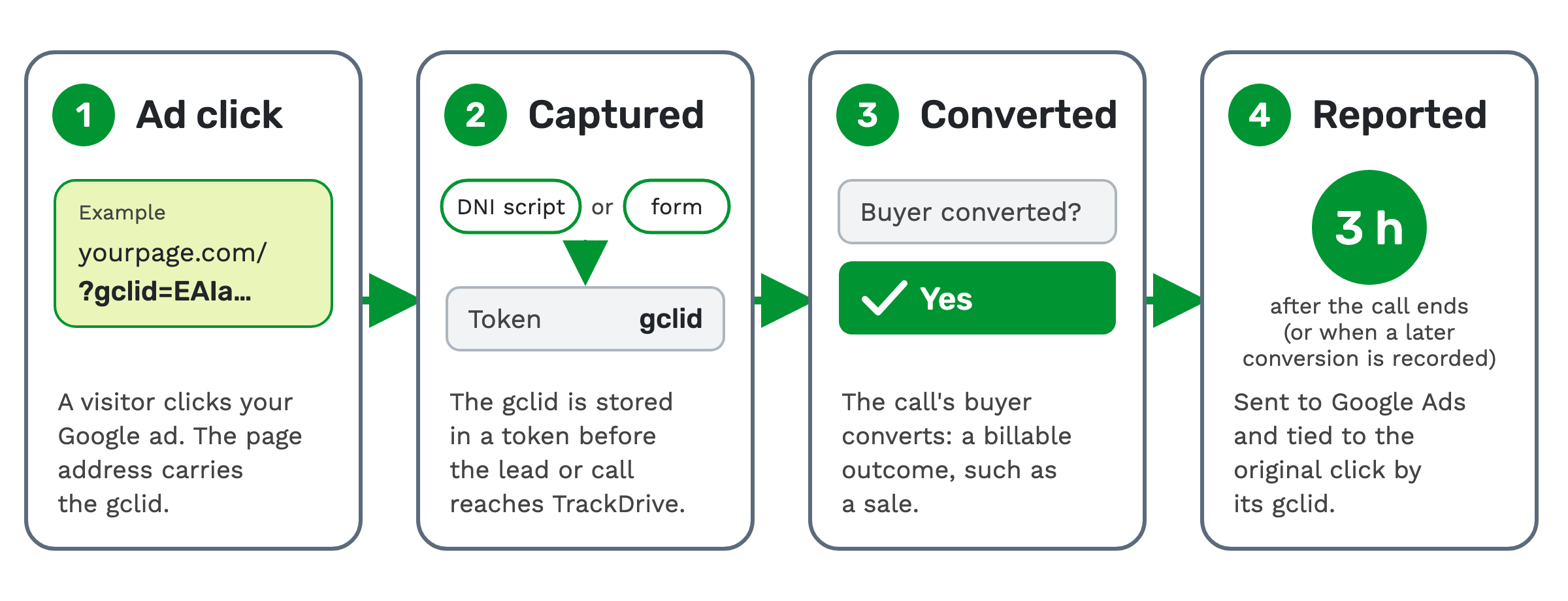
1. Ad click. A visitor clicks your Google ad and lands on your page. The page address carries the gclid.
2. Captured. Your DNI script or your form stores the gclid in a token. The lead or call reaches TrackDrive carrying it.
3. Converted. The call's buyer converts. A conversion means the call produced a billable outcome. That can be a sale, a qualified lead, a booked appointment, or whatever the offer defines as success.
4. Reported. TrackDrive waits three hours after the call ends. If the buyer converted by then and the checks below pass, it reports the call to Google Ads, valued at the call's revenue. If you also name a purchase action, covered below, the call goes at zero and the purchase carries the revenue. Google Ads uses the gclid to tie it to the original click.
It goes as an offline conversion. That is a converted call uploaded to Google Ads after the fact, through Google's Data Manager, and matched to its click by the gclid.
When a call is reported, and when it isn't
A conversion action is the item in your Google Ads account that receives the result. TrackDrive's screens call it a conversion tracker, and a conversion tracker row maps one offer to it.
A call is reported only when every check passes. The main ones:
- The call's buyer converted.
- The call's offer is mapped to a Google Ads conversion action.
- The integration is connected.
- The call has a value in its click id token.
- Any token rules on that row match the call.
The technical guide lists every check.
A buyer conversion recorded after the three-hour wait is submitted within minutes of being recorded. Google Ads may take longer to show it. A conversion removed after it was submitted stays in Google Ads.
TrackDrive's technical guide also notes that Google Ads records an uploaded conversion only when it's first sent within 90 days of the ad click.
What Google Ads receives
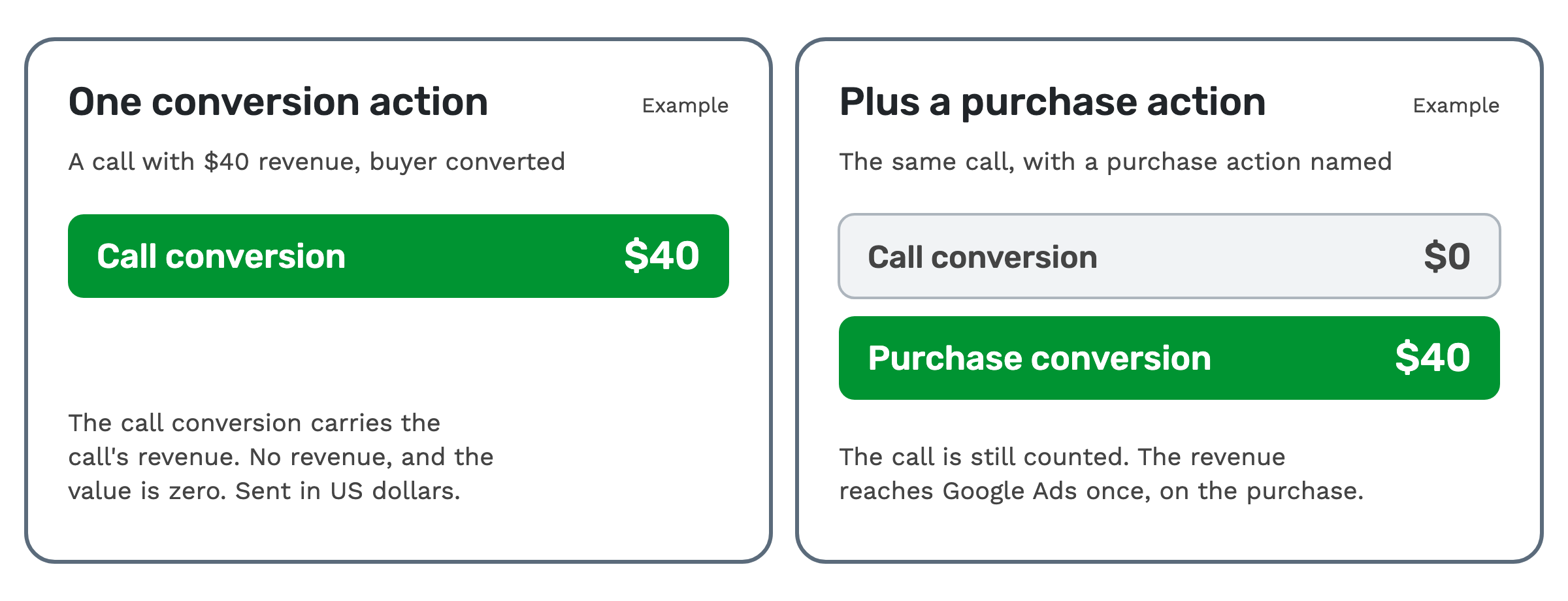
With one conversion action, each conversion carries the call's revenue as its value, in US dollars. If the converted call has no revenue, the value is zero.
You can also name a second conversion action for purchases. When you do, and the call has revenue above zero, the revenue goes on a purchase conversion. The call conversion is then sent with a value of zero.
That way the call is still counted, and the revenue reaches Google Ads once.
 With a purchase action set, revenue can also change after the call, for example when a purchase is posted later
through the API. TrackDrive then sends the call's total revenue to the purchase action. If a purchase was already
reported for the call, Google Ads treats this as an update to its value, not a second purchase.
If the call's revenue drops to zero, nothing is sent. Google Ads keeps any purchase value it already recorded.
Setting it up in TrackDrive
The setup page walks through six steps: Connect Google, Choose Account, Conversion Action, Click ID Token, Live Test and Health. The setup guide covers each screen.
- Connect Google. Sign in with the Google account that can reach your Google Ads account, and approve every permission it asks for.
- Choose Account. Pick the client account that should receive conversions. A manager (MCC) account can't be picked itself, but its enabled, non-hidden client accounts are listed.
- Conversion Action. Pick an existing conversion action, or create a new one from TrackDrive. A purchase action, if you want one, must already exist in Google Ads.
- Click ID Token. Choose the offer and the token that holds the gclid. If auto-tagging is off, this step warns you.
- Live Test. TrackDrive checks it can reach the account, that each conversion action exists, is enabled and imports conversions from clicks, and that auto-tagging is on. The test sends nothing to Google Ads.
- Health. Later visits open a health view, where you can rerun the test and edit each row.
Each conversion tracker row matches one offer. Add more rows when different offers report to different Google Ads accounts or conversion actions.
Checking that it worked
The call log is where you follow each call. Before the three-hour wait ends, it shows a Google Ads offline conversion waiting to be submitted.
If a call is skipped, the log records why. Common reasons are no matching row, a blank click id token, or a disconnected integration.
Google accepts an upload first and processes it later. About 30 minutes after submitting, TrackDrive checks back. It records whether Google Ads accepted the conversion, didn't accept it and why, or had already recorded it.
If Google Ads hasn't confirmed it within 48 hours, the call log marks it unconfirmed. Temporary upload errors retry in the background.
When you don't need it
If you don't run Google Ads, there's no gclid to carry. Inbound call tracking, with a number per source, is the simpler tool.
The integration only reports calls whose gclid was captured. If neither the DNI script nor your landing page can pass it in yet, set that up first.
What it costs on TrackDrive
The pricing page lists no separate rate for the Google Ads integration. The calls and numbers behind it bill at the usual rates.
Inbound calls have a per-minute tracking rate, rounded up to the full minute. That rate includes forwarding the call to your buyer over toll-free or SIP; international and premium rate centers can add cost.
Each tracking number, including the numbers in a DNI pool, has a monthly rate. There's no onboarding fee. See TrackDrive pricing for commit plans.
Questions people ask
Does TrackDrive capture the gclid for me? The Google Ads integration doesn't. TrackDrive's DNI script captures it from the page address and stamps it on the call. On a form, your landing page passes it in.
Is every call reported to Google Ads? No. A call must pass every check: among them, its buyer converted, its offer is mapped, and its token holds a gclid.
Can I use a Google Ads manager account? Conversions go to a client account. Connect a Google account with manager access, and its enabled, non-hidden client accounts are listed to pick from.
What happens if a conversion is removed later? It stays in Google Ads. TrackDrive can't take it back once it's submitted.
How long until a call shows in Google Ads? TrackDrive submits it three hours after the call ends, if the buyer converted by then. A later conversion is submitted within minutes of being recorded. Google Ads may take longer to show it.
See it in action
Request a demo for a live walkthrough tailored to your use case, or start free, with no credit card and no onboarding fee.