Warm transfer vs cold transfer, and what a live transfer is in pay per call
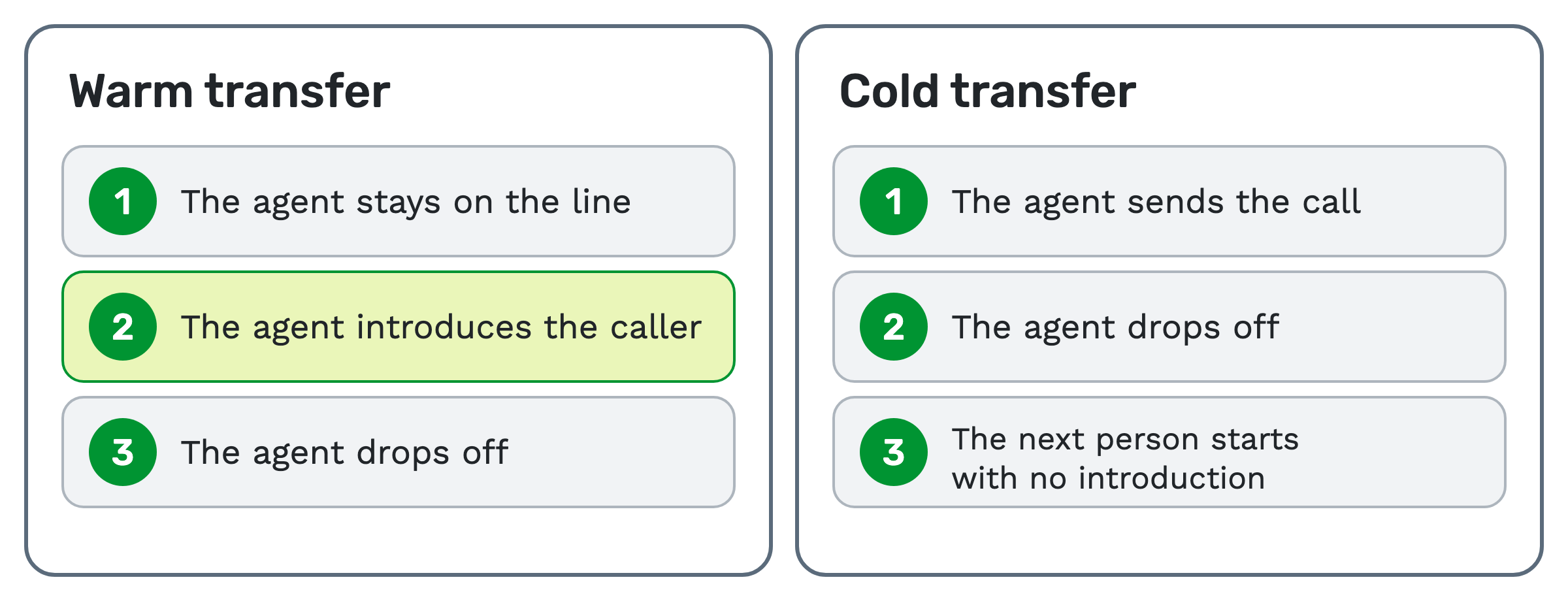
A warm transfer means the agent stays on the line and introduces the caller to the next person. A cold transfer means the agent sends the call over and drops off.
A live transfer is a call handed to a buyer while the caller is still on the line. A buyer is the business that receives and pays for calls.
"Warm" and "cold" describe how the handoff goes. "Live" says the caller is on the line when it happens. So a live transfer can be warm or cold.
Warm transfer: the agent makes the introduction
An agent is the person who talks to the caller first. In a warm transfer, the agent stays on the line and brings in the next person.
The agent introduces the caller and says what they need. Then the agent drops off, and the other two keep talking.
The caller doesn't have to start over. The cost is agent time, because the agent stays through the introduction.
Cold transfer: the agent hands off and leaves
In a cold transfer, the agent sends the call and drops off. The next person starts with no introduction.
The agent is free sooner, so the next call can start sooner. The caller may have to explain everything again.
Some phone systems call this a blind transfer.
Warm vs cold at a glance
| Warm transfer | Cold transfer | |
|---|---|---|
| The agent during the handoff | Stays on the line | Drops off |
| Introduction | Yes | None |
| What the next person knows | What the agent tells them | What their screen or system shows |
| Caller repeats the story | Less likely | More likely |
| Agent time per call | More | Less |
Which one to use
Use a warm transfer when the next person needs context to help. Think of a high-value sale, or a caller with a complicated case.
Use a cold transfer when the next person only needs the call. Think of a simple change of department, or a busy line where agent time matters most.
If you sell calls to a buyer, ask which one the buyer expects. Then count that agent time when you plan staffing.
What a live transfer is in pay per call
Pay per call is a model where a business pays for each qualified phone call. A live transfer connects a qualified caller to a buyer in real time.
Qualified means someone checked that the caller fits what the buyer wants.
A live transfer starts with someone who qualifies the caller, often an agent at a call center. The agent takes an inbound call or dials out to a lead, asks questions, and transfers the callers who qualify.
That's different from a plain inbound call. There, the caller dials a tracking number and routing connects them to a buyer, with no agent in between.
What "live transfer leads" and "warm transfer leads" mean
These are names that lead sellers use. Both usually mean a consumer the seller has spoken to first, then connected to your agent while still on the line.
If you came here to buy live transfer leads, TrackDrive doesn't sell them; it's the platform that tracks and routes the calls.
The words aren't standard, so ask any seller these questions:
- Who qualifies the caller, and with which questions?
- What makes a transfer billable: the connection, a minimum call length, or something else?
- Does an agent introduce the caller, or only connect the call?
- How did the consumer agree to be called?
Calling rules vary by place and by campaign. This is general education, not legal advice.
How a transfer runs in TrackDrive
TrackDrive's help center describes three kinds of transfer. In a warm transfer, the agent stays on the line and introduces the buyer. In a cold transfer, the agent drops off. In an IVR transfer, the caller moves through a menu to choose a destination.
An IVR, or interactive voice response, is a recorded menu. For the other two, agents work live calls in the Agent Control Center, a browser-based screen with a built-in softphone.
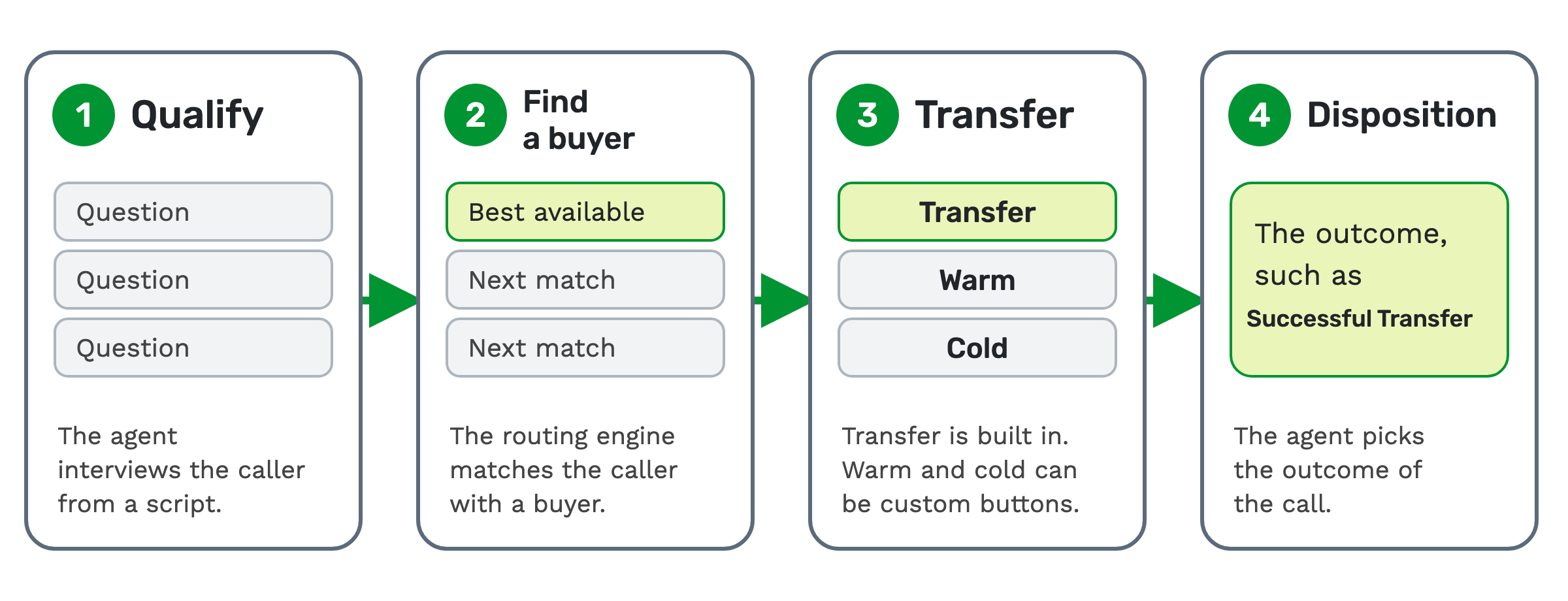
When the agent finds the buyer from this screen, a transfer has four steps.
1. Qualify. The agent interviews the caller from a script. The agent can switch scripts mid-call for a different qualification path.
2. Find a buyer. Find A Buyer triggers the routing engine, which matches the caller with the best available buyer. Matching buyers are previewed live. If the agent updates lead fields mid-call, Refresh Matching Buyers runs the match again.
3. Transfer. The agent hands the call to a buyer. The Transfer button is built in.
A company can also add custom buttons for warm transfer or cold transfer. The custom buttons an agent sees depend on what its administrator has configured.
4. Disposition. A disposition is the outcome assigned to a call. A new company's default dispositions include Successful Transfer, Transfer Failed, and Transfer Failed / Set Callback.
The controls that matter during a handoff
- Hold Caller stops the caller hearing the conversation until the agent brings them back.
- The Participants panel shows everyone bridged into the call: the caller, the agent, buyer legs and voice agents. A leg is one party's side of a call.
- Disconnect Buyers hangs up the current buyer leg and keeps the caller connected.
- Schedule Callback ends the live call and schedules a callback for later.
What the routing engine checks
The routing engine looks at every buyer on the call router. It filters them by token matching, business hours, capacity caps and suppression lists. A token is one named piece of call data, such as the caller's state.
It then sorts the rest by tier and weight, by revenue, or by EPC, which is earnings per call. See how to route inbound calls for each method.
Handoffs with no human agent
AI voice agents. TrackDrive connects an AI voice agent from your own provider account; ElevenLabs is the provider its page lists today. Its page describes the agent qualifying leads and warm-transferring to a human when intent is high. More in AI voice agents for call qualification.
Whisper messages. A whisper message plays a brief message to the buyer before connecting, announcing campaign or caller details. It gives the buyer some of what an introduction would.
Forwards. A forwarded call goes to a destination outside the normal buyer-matching path. You set that on the tracking number, or as an action step in the offer's call flow. Voice agent calls can also forward through flow actions.
What counts once the buyer has the call
Every leg of a transferred or forwarded call has a call record. When a call is forwarded through a buyer, it still records the buyer attribution, the payout and the conversion.
A call converts when it meets the buyer's conversion rules, such as lasting a minimum number of seconds you set. It can also convert when the buyer reports it by postback, a message one system sends another to report a result.
If Press-1-to-accept is set up, the buyer pressing 1 starts the duration timer. In a buyer group that rings every buyer at once, the first to answer wins the call, or the first to press 1 if Press 1 to Accept is on.
The disposition is the label for the outcome, chosen by the agent or set by the system. The conversion follows the buyer's rules.
TrackDrive tracks the earnings; it never pays anyone out.
When you don't need transfer tools
If callers go straight from an ad to one buyer, nobody needs to hand them off. Routing and a tracking number are enough.
Transfer tools earn their place when someone qualifies the caller first. That can be an agent on your floor or an AI voice agent you connect.
What it costs on TrackDrive
Inbound calls are a per-minute rate, billed as you go and rounded up to the full minute. That rate includes forwarding the call to your buyer over toll-free or SIP; international and premium rate centers can add cost.
If an agent dials out, the dial to the lead is billed as Outbound To Consumer. The pricing page has no separate line for a transfer.
See TrackDrive pricing for the rates. There's no onboarding fee.
Questions people ask
Is a live transfer the same as a warm transfer? No. A live transfer means the caller is on the line during the handoff. A warm transfer means the agent also stays and makes an introduction.
What does warm transfer mean in a call center? The first agent stays on the line, introduces the caller to the next agent or buyer, then drops off.
Is a cold transfer a bad transfer? No. It suits simple handoffs where the next person doesn't need the back story.
Can my agents dial out and then transfer? Yes. The Power Dialer dials leads, screens for live answers and bridges the call to an available agent.
TrackDrive doesn't pre-check leads against the federal Do Not Call registry; scrub your lists before import. See call scrubbing. This is general education, not legal advice.
See it in action
Request a demo for a live walkthrough tailored to your use case, or start free, with no credit card and no onboarding fee.