What is an IVR? Key-press menus and call flows, explained
An IVR, or interactive voice response, is an automated phone menu. The caller answers it by pressing keys or by speaking, and the answer decides where the call goes.
In TrackDrive, an IVR is part of the call flow. A call flow is a rule that fires at a set moment in a call to decide what happens next.
Why ask the caller first
In pay-per-call, a buyer is the business that receives and pays for calls. A buyer may want only certain calls, such as callers from certain states.
An IVR can ask its question before a buyer is dialed. The answer can then steer the call to a buyer that fits.
How an IVR works on TrackDrive
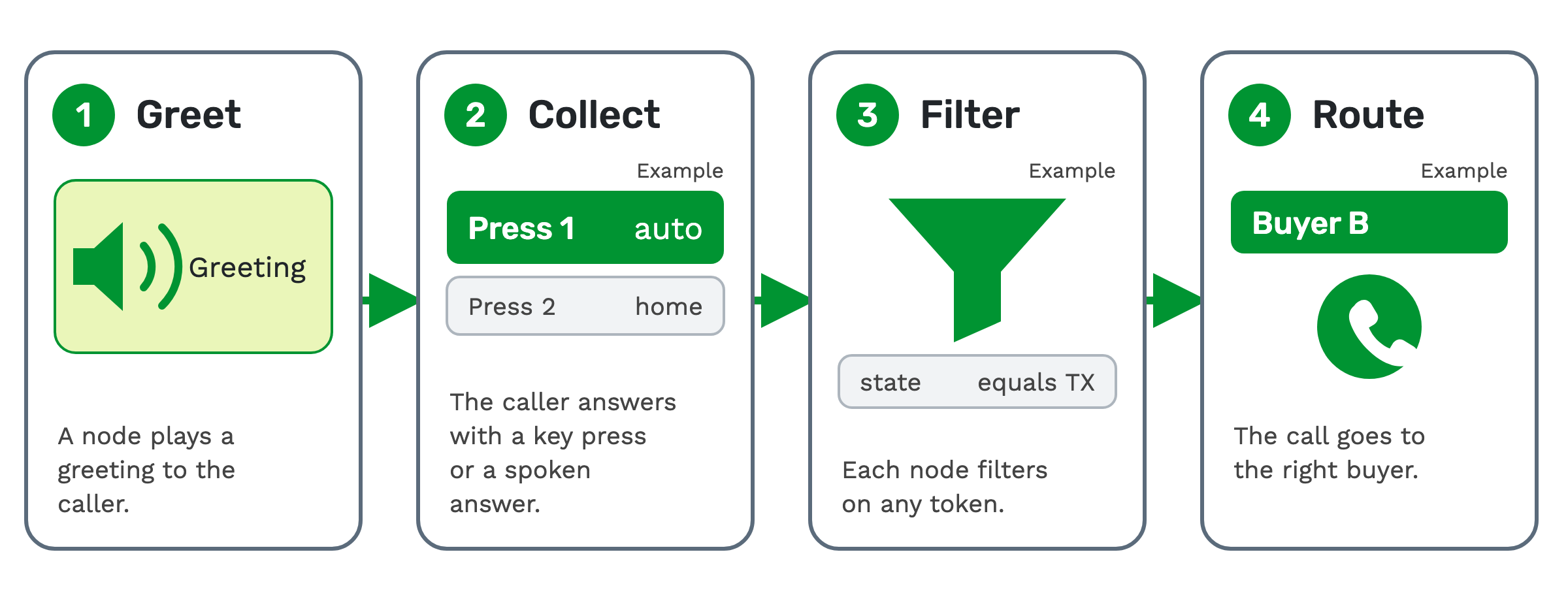
TrackDrive builds IVRs from call routers, with no code required. The call tracking feature page describes them as nodes, and names four things a node does.
1. Greet. A node plays a greeting to the caller.
2. Collect. The caller answers with a key press or a spoken answer.
3. Filter. Each node filters on any token. A token is one named piece of call data, such as the caller's state.
4. Route. The call goes to the right buyer.
A node can also fire a custom webhook before or after it runs. A webhook sends call data to another system the moment an event happens.
Asking a question with a routing response
A routing response is an IVR prompt tied to one token. When a call carries a specific value for that token, TrackDrive can play a message, collect key presses and branch the call.
You set the prompt on the token's edit page:
- A text-to-speech message, which can include other tokens.
- The voice gender and how many times the prompt loops.
- A prompt priority. Tokens with lower values are asked first.
Each key press row maps a DTMF digit, or a digit sequence, to a destination. DTMF is the tone a phone keypad sends.
Example: "Press 1 if you are calling about auto insurance. Press 2 for home insurance."
Which token fires, and when, depends on the call router set up on the offer. An offer is the campaign the call belongs to: its numbers, its buyers and its payouts. The routing responses guide covers each field.
Key presses during the call
Key Press Flows let callers and external agents control a call from their keypad. Each flow maps one key, 1 to 9, * or #, to a set of actions.
You assign a group of flows to a buyer that forwards to an external call center, or to a tracking number.
A key press can:
- Apply a disposition and end the call.
- Run call control actions, such as muting the consumer, blocking the caller or playing audio.
- Rerun call routing and dial the next available agent or buyer. Any live agents or buyers are disconnected.
A disposition is an outcome an agent or the system assigns after a call, such as "not qualified". A flow can also attach webhooks.
A buyer conference time limit runs a flow's actions only if the buyer has been in the conference for under a set number of seconds. That guards against accidental key presses late in a call.
If no flow matches, the caller is asked to press a key again. See the key press flows guide.
Buyers can press a key too. Calls can be marked converted by duration, and if Press-1-to-accept is set up, the buyer pressing 1 starts the duration timer. See buyer management.
When no buyer fits
TrackDrive's exception call flows cover four cases: no buyers have open concurrency, all buyers are closed, no buyer answered, and no buyers match.
The no-buyer, no-match and no-answer cases can fall back to handlers you customize, such as voicemail or a hold queue. How inbound call routing works explains how the buyer is picked.
The audio the caller hears
Greetings, hold music and voicemail messages come from sound files. MP3 is recommended; WAV, OGG and FLAC also work.
Playlists group sound files, and a sound file can carry filters so it plays only on matching calls. Call control actions can also whisper a playlist to call participants while a call is live (what are whisper messages?).
What it costs on TrackDrive
The pricing page has no separate line for an IVR. Inbound calls have a per-minute tracking rate, one for local tracking numbers and one for toll-free, rounded up to the full minute.
That rate includes forwarding the call to your buyer over toll-free or SIP; international and premium rate centers can add cost. There's no onboarding fee. See TrackDrive pricing.
Questions people ask
Can callers speak instead of pressing keys? Yes. TrackDrive's IVR nodes collect key presses or spoken answers.
Can a key press send the call to another buyer? Yes, where a key press flow group is set up (on a buyer that forwards to an external call center, or on a tracking number). The flow can rerun call routing and dial the next available agent or buyer.
See it in action
Request a demo for a live walkthrough tailored to your use case, or start free, with no credit card and no onboarding fee.